In this course you make your own game: a bowl catches falling fruit and dodges bombs. Trong khóa này em tự làm một game: cái bát hứng trái cây rơi xuống và né bom.
🚀 1. Open Scratch
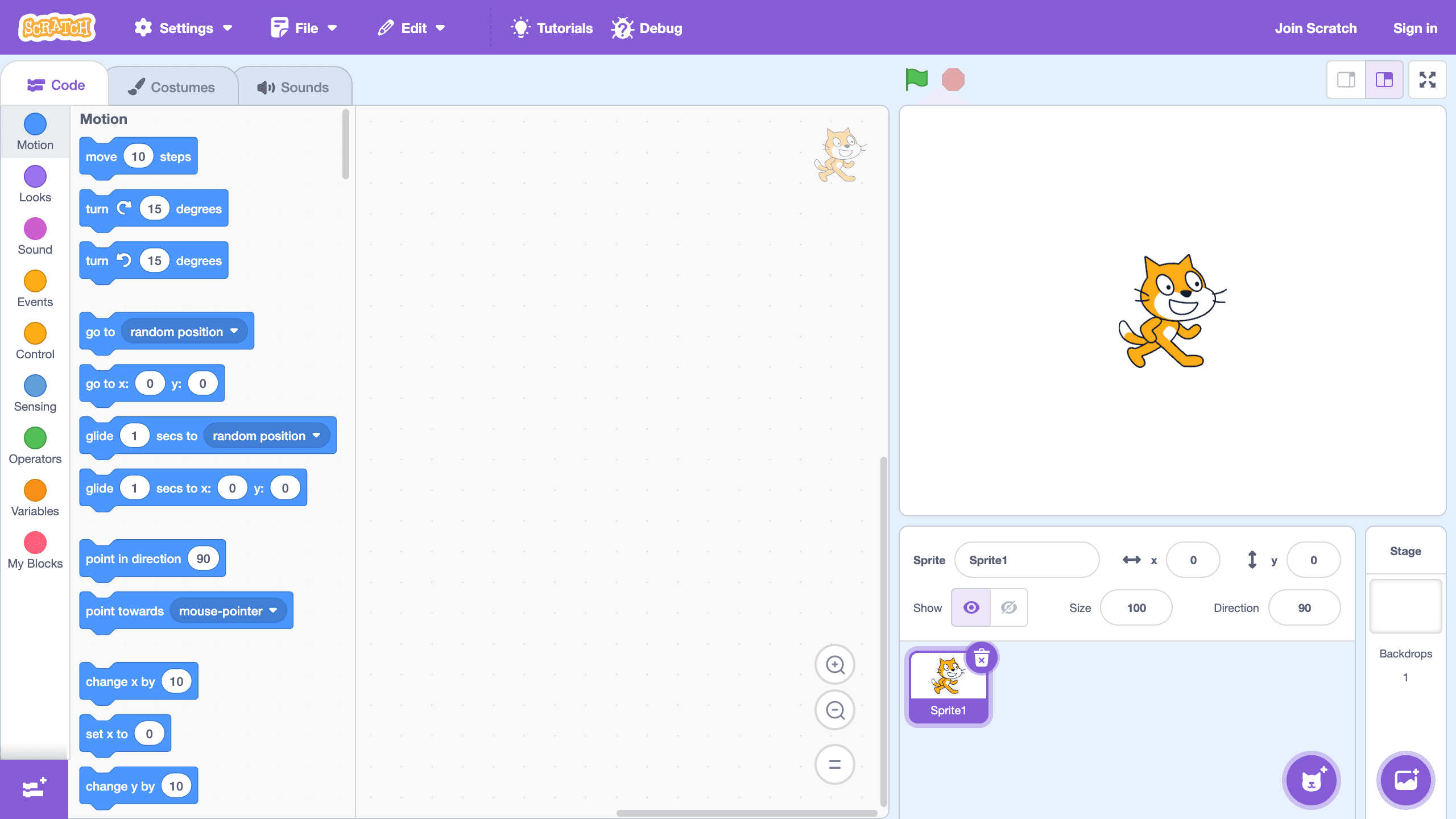
Scratch editor — where you build. Trình soạn thảo Scratch — nơi em lập trình.
scratch.mit.edu — click Sign in (top right). Bấm Sign in (góc trên bên phải) để đăng nhập.
Sign in first! / Đăng nhập trước!
If you are not signed in, Scratch cannot save your project. Nếu chưa đăng nhập, Scratch không lưu được dự án của em.
🎮 2. The 3 Games
Play each game. Then click See inside to look at its blocks. Chơi từng game. Sau đó bấm See inside để xem các khối lệnh bên trong.
Game 1 — Maze / Mê cung
Play Maze Starter — move the ball with the arrow keys. Dùng phím mũi tên để di chuyển quả bóng.
Game 2 — Pong
Play Pong Starter — keep the ball off the red line. Đừng để quả bóng chạm vạch đỏ.
Game 3 — Catch & Dodge / Bắt Trái Cây
The game you will build. Your teacher gives you the link in class. Move the bowl with the mouse, catch the fruit, dodge the bombs. Đây là game em sẽ làm. Thầy sẽ gửi link trong lớp. Di chuột để cái bát hứng trái cây và né bom.
Want a similar game right now? Try the Catch Game tutorial. Muốn thử ngay một game giống vậy? Làm theo hướng dẫn Catch Game.
🖥️ 3. The Scratch Editor
Click a number to see what that part of the editor does. Bấm vào một con số để xem phần đó của trình soạn thảo dùng để làm gì.
Block categories — Each colour is a group of blocks (Motion, Looks, Sound, Events…). Click one to jump to its blocks.
Block palette — All the blocks of the chosen category. Drag a block from here to use it.
Code area — Snap blocks together here to make scripts for the sprite you selected.
Stage — Where the game runs — you see the sprites move here.
Green flag — Starts the program: every script under “when green flag clicked” runs.
Stop — Stops everything.
Code / Costumes / Sounds tabs — Switch between the sprite's code, its pictures (costumes) and its sounds.
Sprite info — The sprite's name, its x and y position, show or hide, size and direction.
Sprite list — All your characters. Click one to see and change its code.
Choose a Sprite — Adds a new character from the library.
Choose a Backdrop — Changes the picture behind the stage.
🧩 4. Quiz — What Does This Block Do?
Pick an answer, then click Check. Chọn một đáp án, rồi bấm Kiểm tra.
Block 1
Block 2
Block 3
Block 4
Block 5
Block 6
Block 7
Block 8
Block 9
Block 10
Block 11
Block 12
Block 13
Block 14
Block 15
Block 16
Block 17
Block 18
⭐ 5. Challenge — Read the Scripts
What does each script do when you click the green flag? Mỗi đoạn code làm gì khi em bấm cờ xanh?